Recently got the Zwift Ride with the cog v2. The cog came installed on the Kickr Core. I noticed that the cog was rubbing against the frame after my ride this morning, but I have both the drive side (adapter C) and non-drive side (142) adapters installed. As you can see the in the picture, there is no space despite the adapter. I emailed zwift support, but figured I would get a faster response here. Has anyone experienced this?
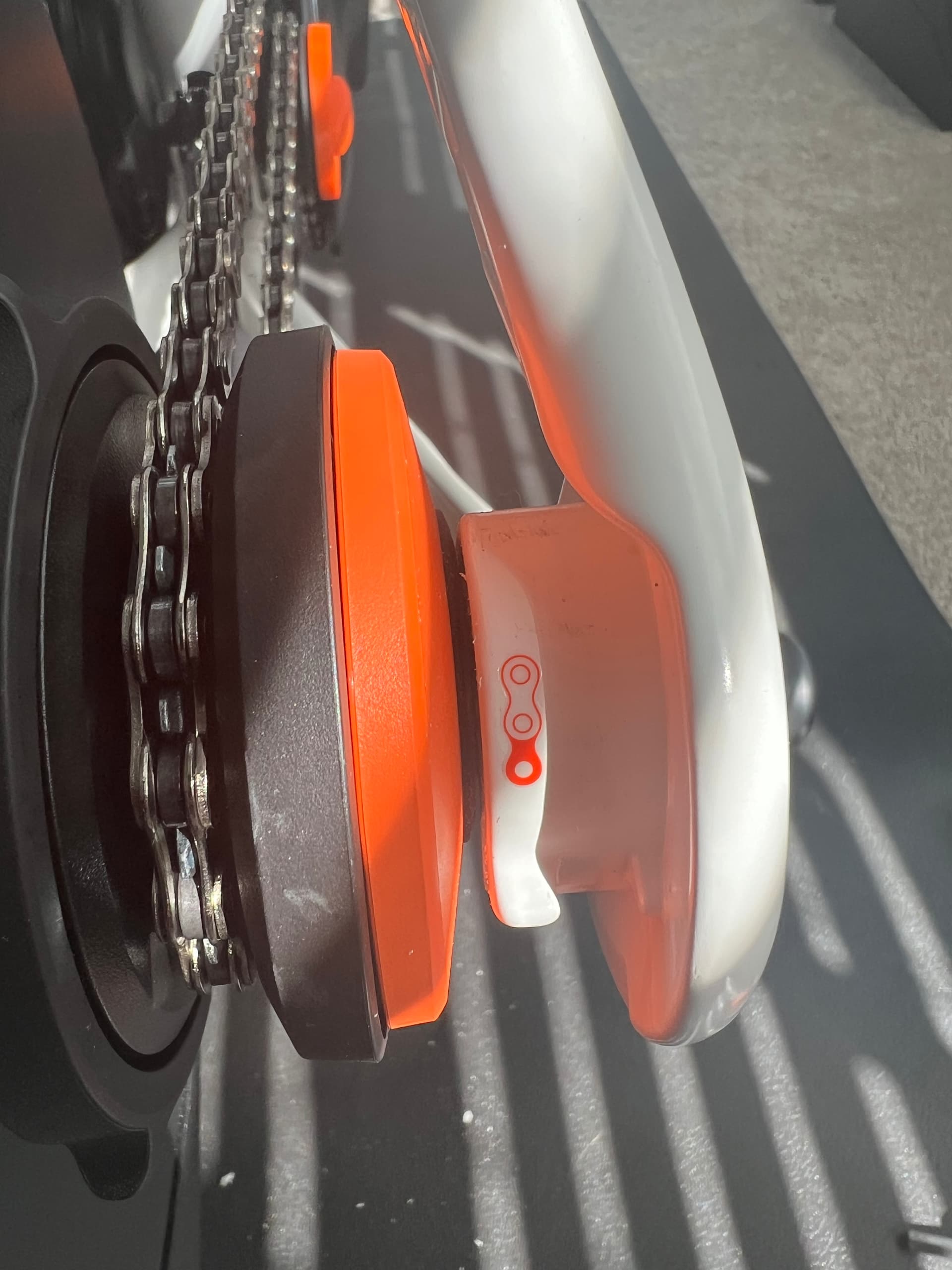
Try loosening up the through bolt just a hare and see if that gives you some clearance, you may have over torqued it during assembly by accident.

Just noticed what looks like a dent in the frame. Is that supposed to be there, or could that be what’s causing the lack of clearance?
If you’re talking about the crimp in the right chainstay under the chain tensioner, that is required for chain tensioner clearance and is normal.
The only situation I have seen previously where there was insufficient clearance for the cog was when the drive side spin cap was missing from the trainer. That is part 7 seen here:
I can’t tell if you have it installed or not.
Yes, I have that spinner installed. Kickr lists it as “Adapter C.” That’s really my main issue. I have that, as well as the 142mm spacer, installed, yet there is no clearance between the lock ring and frame.
The only other possibility I can think of is if the freehub is not completely installed in the trainer. If you get it sorted out I hope you will post an update with the solution.
I’m worried that might be the issue, which sucks, since I bought the complete package with the Cog already installed on the trainer. I will update if I find a solution.
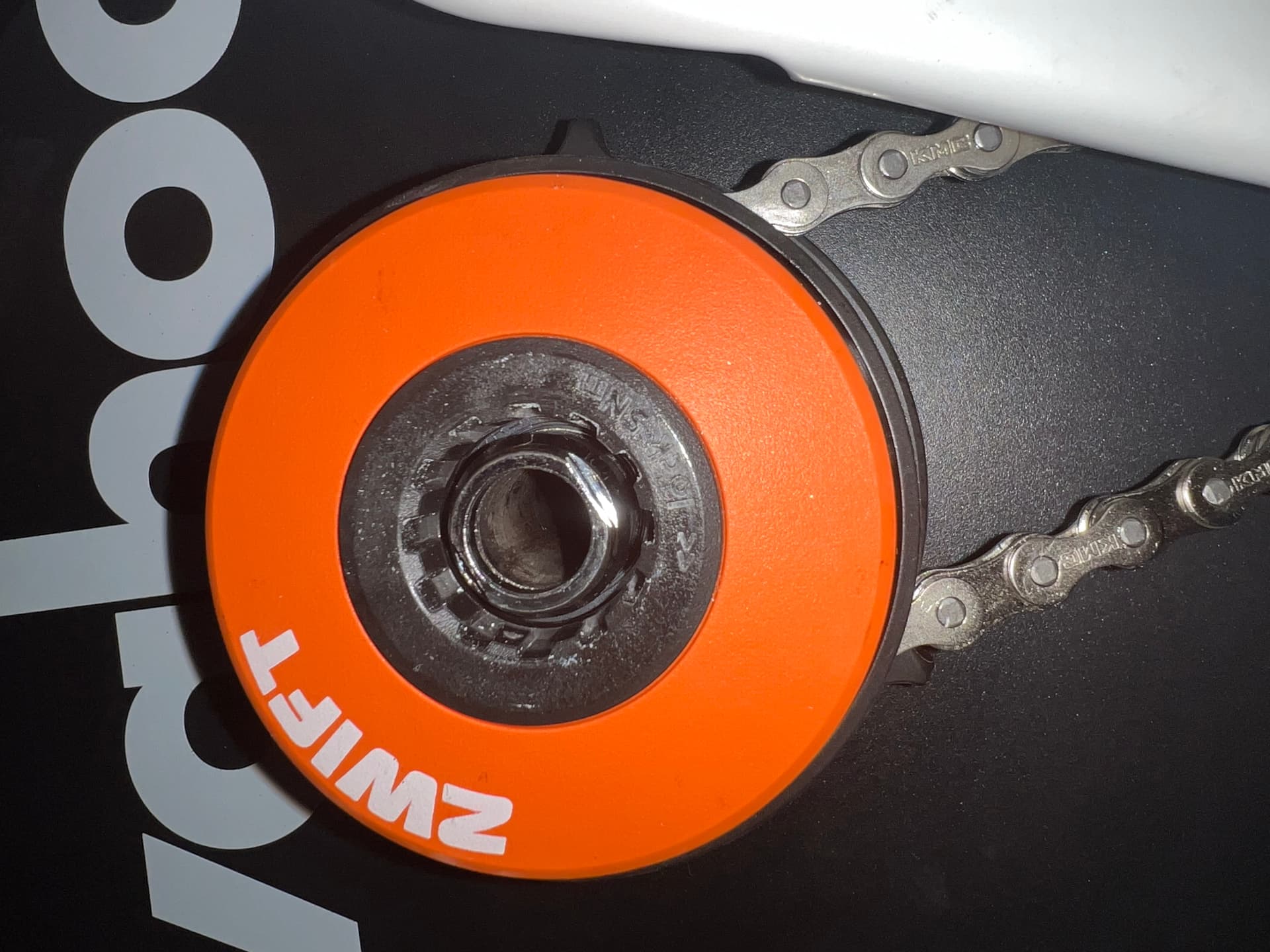
This is what it looks like when I remove the adapter. Does it look like anything is missing? The adapter seems to be able to slide in much further than it does on the Zwift Ride assembly video.
1 Like


That looks like adapter 5, Shimano lock nut, which should have adapter 7, spin cap, installed on top of it. Note the wrench flats on the sides and the lack of a serrated surface facing the frame.
If it still doesn’t stick out far enough with the spin cap installed, I’m guessing either the freehub is not fully inserted into the trainer, or the cog is not assembled properly on the freehub. There is an assembly diagram for the cog on the Zwift website: Assembling Your Zwift Cog

Thanks for the help so far, Paul. This is the spinner inserted into the cog. I’m not sure what to do if the cog was installed improperly to begin with, since it came pre-installed.
Yea, ignore my original post, I forgot you had the Core / Ride combo.
Hmm, give that this is a Core / Ride combo, I think you may have what’s referred to as a “stack up” issue in the manufacturing world. This is where the stack up of the various tolerances of the components allows for an interference when everything is assembled on the very rare occasion.
The bike off pictures of the trainer look ok, the adapter is sticking out past the orange cover cap, the respective depths of components on the other side of the gear look similar to my Core V1.
So unless someone installed the wrong spacer, (see if there is a “longer” one in the box) may just be a stack up issue. My original suggestion of a couple washers would be a quick fix / test to see if that solves the problem.
Cheers
I’m using the Zwift Ride frame, so I’m not sure if there is supposed to be a recessed area or not, but the other pictures show the Ride having plenty of clearance when using the adapter without the need of any washers. If all else fails, I’ll try the washers. Thank you!

I don’t have one of these but from your picture it looks like there may be an o-ring or something similar that isn’t installed correctly - it’s partially under the lock ring (see the arrows).
You should be talking to support about the experience. I can’t tell if you have an unexpected gap between the freehub and the trainer that would reveal if it’s not fully inserted. Other possibilities would be removing the freehub and reinstalling it, removing the Cog from the freehub and verifying its assembly, but none of this should be necessary given that you bought a ready to use product and it looks like you have the right adapters installed. I would not install some washers and ride it that way forever without contacting support. If some extra spacer helps you ride today then fine but I would want to get it working in the way it’s designed to work.
Understood. I emailed support, but I haven’t gotten a response yet. I was actually hoping someone from Zwift would see this thread and reach out. Thanks for all the help! I will continue to update if I find a solution.
Spacers mixed up and on wrong ends of the axle? Is that possible? Longer one currently on non-drive side should be on drive side and vice versa?
Anything is possible. There is a difference in length between the drive and non-drive side adapters.
Hi @Aaron_Easter.
This is Haziel from Zwift Support. I know how important this issue with the rubbing on the Zwift cog is, and I just wanted to confirm that I was able to find your email and have already replied directly to you there. You should see a message from me in your inbox with the next steps.
Go ahead and check when you get a chance, and feel free to reply so we can keep things moving. We’ll make sure you’re taken care of.
1 Like
In case anyone was curious for an update, Zwift support reached out to me and sent a replacement cog. I took my trainer to my LBS since I didn’t have the tools to remove the original cog, and they were able to help me out. Apparently, the free hub with the original cog was the incorrect size, which is why the drive-side spacer was not working. The replacement cog and free hub worked as intended and my frame is no longer rubbing.
3 Likes