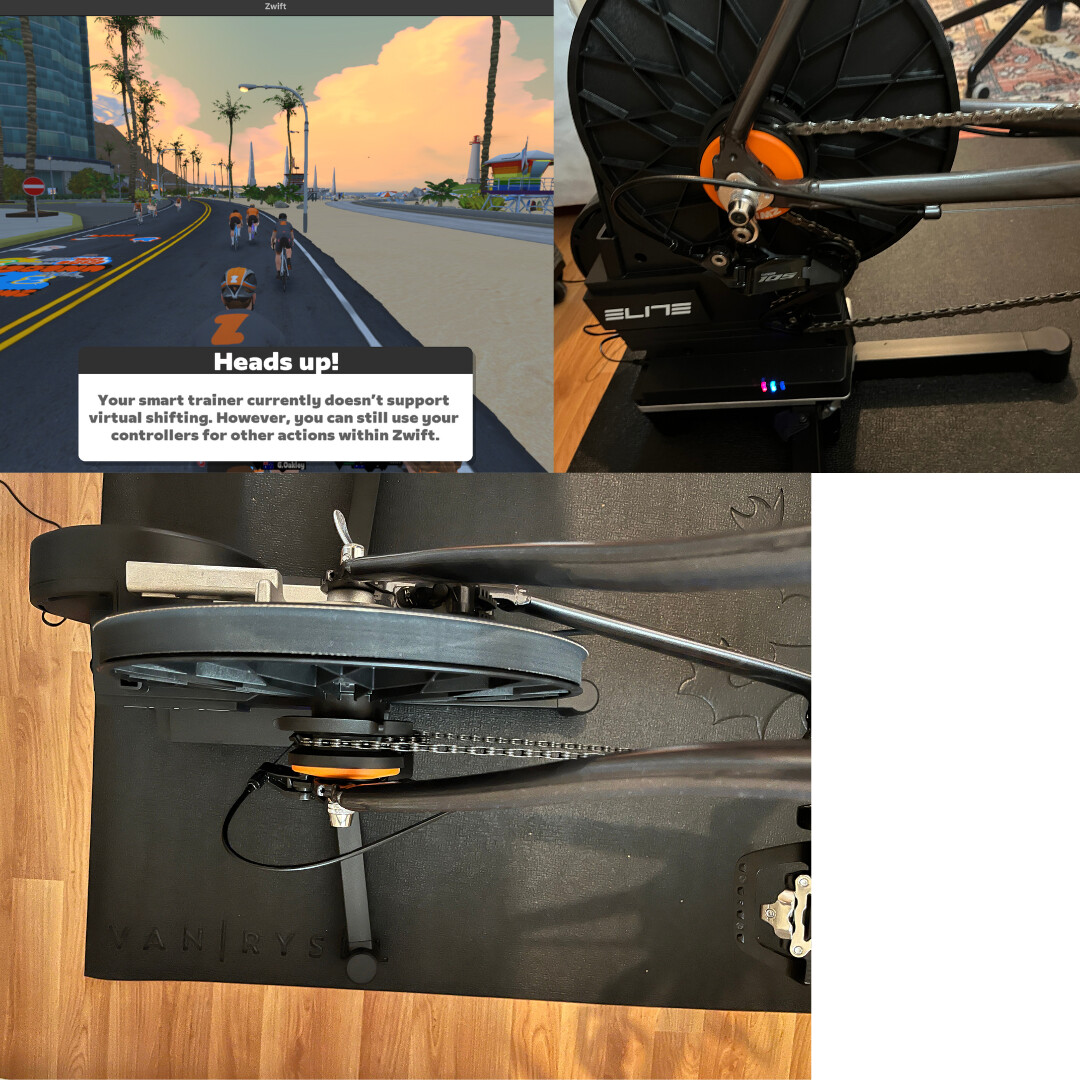
I recently picked up an Elite Avanti trainer and added a Zwift Cog plus the previous-gen single-click Zwift Click (the model right before the September update).
After setup, the Zwift app shows:
“Virtual gear shifting is not supported on your device.”
What I’ve tried:
Latest firmware on both the trainer and Zwift Click
Tested on iPhone and MacBook (same warning)
Confirmed Bluetooth pairing (not ANT+), re-paired multiple times
What’s causing this message with this setup, and how can I fix it to enable virtual shifting?
Thanks for the guidance, but unfortunately it didn’t solve the issue.
I’m not exactly sure what the problem is. I got the Zwift Cog and Zwift Click from a friend, both brand new/unopened. I’m wondering if they might be incompatible with the Elite Avanti, though I don’t know if that’s even possible. It’s also possible I didn’t install the Cog/Click correctly—based on the photo, the setup looks fine and I don’t see anything obviously wrong. Also, in ERG mode the automatic resistance control works without any issues. In-game, when I go to My Settings → Hardware, I don’t see any option or indicator related to Virtual Shifting.
With the Click V2 it’s normal to not see any virtual shifting on/off switch, but if it were working there would be shift style and gear range settings. Elite support could confirm that the firmware on your trainer is the correct version to support virtual shifting. If ERG mode is working then the trainer must be paired correctly for Resistance.
Hmm, since you said you got the cog and click from a friend, I’m assuming that you had been using the trainer with a normal cassette before the switch?
If so, I would go into the Elite app and look at the settings for your Avanti trainer and see if there is something there to enable virtual shifting. There is a setting somewhere that tells Zwift that the trainer you have is capable of virtual shifting. I don’t know if it’s just the presence of the Click or not, but something has to tell the system to enable that option. And since you switched from a cassette to the Cog, you have to get Zwift to recognize the change.
Neither Zwift nor Elite have said there is any such Elite-specific setting to be made, so I’m pretty sure there is nothing on the Elite end to do other than make sure the firmware on the trainer has been updated.
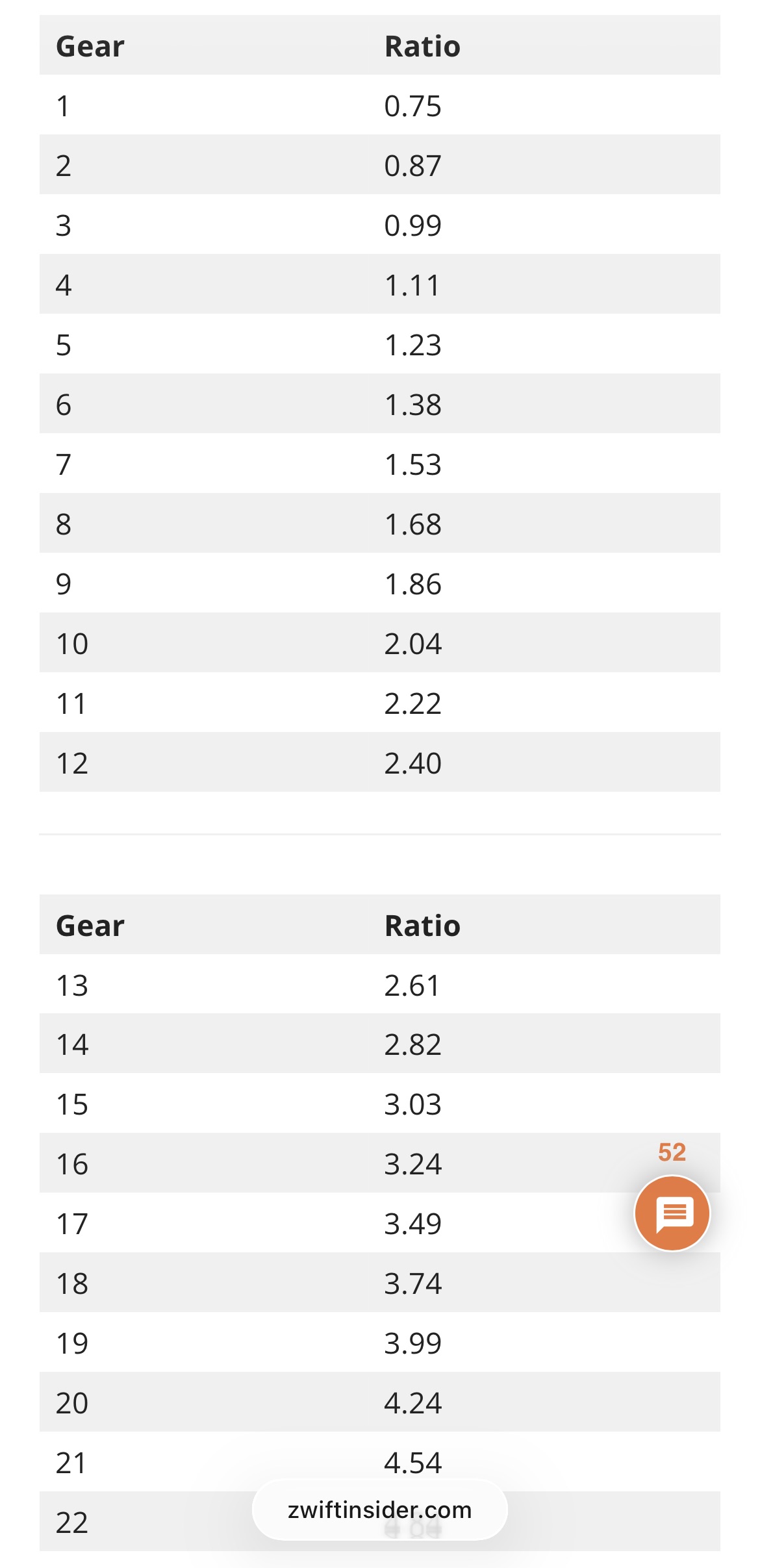
I also have problems with Elite Avanti (FW:36) and Zwift Cog&Click V2 compatibility. In principle, everything works, but in sequential mode I can’t get the full virtual gear range. The resistance doesn’t change in speeds 1-10. There’s no way to achieve the promised 0.75 first gear. Workouts that require high cadence with low watts are impossible to perform. Chat gpt claims that the problem is on the Elite side, whose FW doesn’t allow the trainer to reduce the resistance to the level required by Zwift Cog&Click. If I understand correctly, the only solution at the moment is to ride with the front small cog?
Elite Avanti fm updated to v36, brand new Zwift Cog & Click v2 and I am not able to run virtual shifting. Tried to reinstall, but no difference. Can somebody help?
For Tom but everyone else here actually;
Elite support just helped me do it successfully. Please reach out to them.
The instructions are in this page (sorry I’m not allowed to post links) google “Execute-a-JSON-file-with-Upgrado”. but you need a special firmware (ZIP version, not JSON though) from them.
The process is kind of tricky (at least on iPadOs) but it works 100%. If you didn’t see the below image, then you didn’t make it right.
This seems important. I think it’s quite likely that at least some people who can’t get virtual shifting to work on newer Elite trainers may well be connecting their trainers via wifi.
I understand the gear ratio range as the ratio between the front and rear sprockets, where .75 means that the front, for example, is 34T, and the rear is 45T. 34/45 ~ 0.75, but dividing the front 60T by 11T gives almost the promised 5.49 ratio.
What did I misunderstand?
P.S. If the laws of physics in the “zwift world” differ from objective reality, then what is the reliability of any numbers in the “zwift world”?