This is how I’ve managed this. Get a subscription to RunGap, connect it to Zwift as a data source and Garmin Connect as a destination. Tell RunGap to send “fake” Garmin data so that Garmin thinks it is coming from a Garmin Device…now you’ve got training effect in Garmin Connect.
Hi. Long time since anyone posted here, but my question is this… has anything changed?
I log my workouts on Zwift, and they get uploaded to Garmin Connect. I also record my workouts with my Garmin watch, so I end up with two entries for the same workout in Garmin Connect. Does anyone have experience with this? Is it necessary to record with both?
I want to track my endurance score, FTP, training readiness, and other statistics, but I’m not sure if the app should use data from the watch or if the data from Zwift is sufficient. I have A Jetblack trainer, so maybe I can connect the watch to that one, but I want to avoid duplication of data…
Thanks for your help!
If you record only in Zwift, you’ll get Training Effect, but you won’t get TSS, IF or Intensity Minutes. At least, that’s how it works for me.
e.g. this was a Zwift activity:

This was recorded on my Garmin watch:
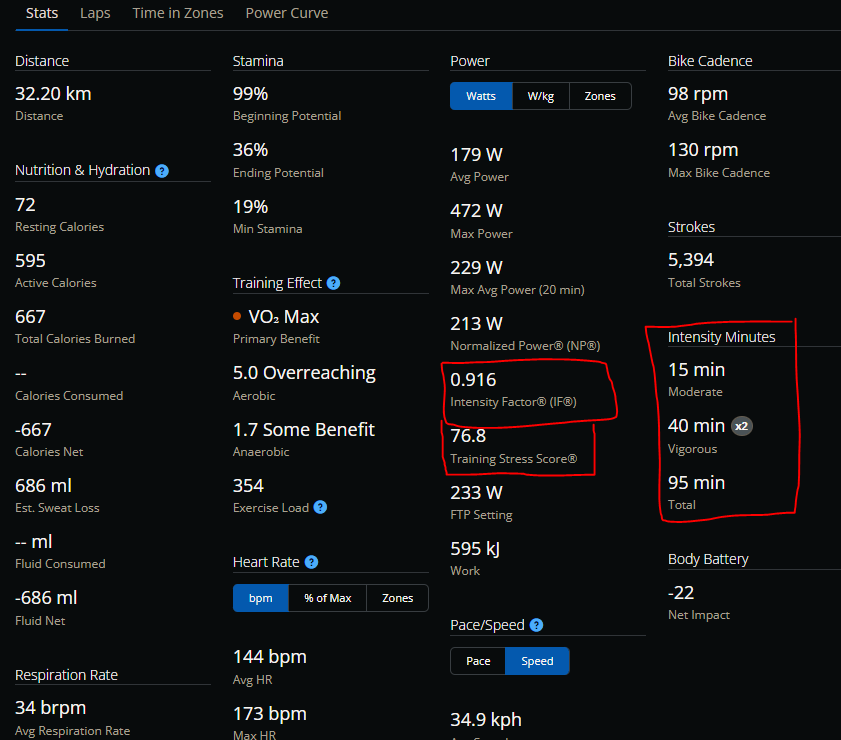
I think that because you get the Training Effect, it will still be reflected in Excercise/Training Load, but I always record both and delete the Zwift activity from Garmin.
Thanks. I notice that the garmin recod double as many kilometers, and a lot more calories burned… is this the same activity?
If you record a Zwift activity also on a Garmin device then the Garmin version will be way off. This is because the Garmin knows nothing about the Zwift terrain that you’re riding on, and Zwift calculates speed/distance in a very different way.
No, different activities. The only reason I had that Zwift activity still in Connect to dig the data out was because I forgot to start my watch.
That said, the Garmin device usually records a different distance compared to Zwift. Either because it uses a lower speed for my power, or because I start it earlier as I sit in a start pen etc.
Ok, a year later and here we are again (Maybe it’s because winter in the northern hemisphere is when people zwift the most). Has any of this improved at all?
It sure feels like I am having the same issue, I did tons of zwift riding in december including the festive 500 and none of that counted towards several of my garmin connect metrics. It straight up told me I did f* all for my fitness in december and I am detraining for more than a month.
It’s a Garmin issue. If the activity was not recorded on a Garmin device your metrics will not update. What I do is alter the file in Garmin using Fit File tools and change the device to Garmin. It’s a pain but at least your Garmin metrics are all correct.
I had to record an indoor biking activity from my Garmin device so that it syncs to Garmin Connect. After that all my Zwift activities (assuming you have Zwift and Garmin connected) synced to Garmin Connect and applied training effect and all the other metrics. No idea if it was just coincidence, but what I did to resolve this.
Including IF, TSS and “Intensity Minutes”? Those were things that I only got if I recorded on my Garmin watch.
Re Garmin recording for connect features I use the following…
Run a garmin 1030 at same time as zwift to record activity. Have 1030 set to training free ride.
After the ride stop 1030 and save it. Stop zwift and save it.
Open starve and delete the ride from the Garmin input. This is just called training ride and not the Zwift route. This ensures that your not doubling your Strava data.
Then enter garmin connect and here you have to edit the ride from the Garmin device compared to the Zwift ride.
Add the title, change the mileage to correct amount, add elevation and decent, add calliries and drink consumed and add any photos from zwift.
Then after all data is matched, delete the Strava ride from garmin.
This ensures that Strava and garmin have the same date from the ride. After a few days, this an be done quite quickly.
You get all the Garmin challenges badges, all the FTP data and training effect to data etc.
Hope this helps.
I just record on the watch and Zwift, then delete the Zwift activity from Connect, and the Garmin activity from Strava.
Only exercise load is captured, which I thought the OP was referring to. Before I did this Zwift activities would show up in Garmin Connect, but didn’t have any exercise load so Garmin kept telling me I was not training even with several Zwift activities a week.
You are correct the other metrics are not captured unless you record on a Garmin device.
Just to share my experience — this doesn’t seem to be a general limitation in all cases.
For me, Zwift activities do show the full set of metrics in Garmin Connect, including VO₂max, training load and training status. I’m using multiple Garmin devices (including an Edge 530), and my Zwift rides are synced directly with heart rate and power data.
My impression is that whether all metrics appear depends on the individual setup (linked Garmin devices, Physio TrueUp, HR data, etc.), which might explain why results differ between users.
I understand this depends on the device you have available, and whether Physio TrueUp is enabled or the device has Unified Training Status.
If so, then a Zwift activity should count towards things such as VO2 Max estimation, as long it’s synced to Connect.
Even so, I don’t believe TSS and IF ot intensity minutes get populated from a third party activity. I’d have to check again to be certain, but I’ve never seen them in past activities.

To help sort the answers above:
Training Effect/load are calculated on the watch during a recording, not in Connect, so a Zwift-only file won’t get them; and dual recording is the only way to get them.
The part people hate is the duplicate afterwards (I know I hate that too… but such is life) and the tidier way is to merge your two files: keep the watch recording as the base and bring in Zwift’s distance, elevation and route, then replace the two Connect rides with the merged one.
I wrote https:// thesplit .fit to do that merge. Free, no account, files are uploaded and held temporarily in memory. It also reports which totals in the result it can no longer state, so you know what to double check.
“Training Effect/load are calculated on the watch during a recording, not in Connect, so a Zwift-only file won’t get them; and dual recording is the only way to get them.”
That is incorrect. With Physio TrueUp and connected accounts, Zwift activities automatically feed into your training load and effect after a quick device sync. Dual recording is not required.
Warning: Avoid uploading your FIT files to unknown websites for security and privacy reasons.
You’re right, thanks. I mixed up two different things in my memory. Training Load/Effect don’t require dual recording: Connect can count a linked Zwift activity toward load and Training Status if you have connected the accounts.
What a watch recording adds is the wellness side, Body Battery, respiration, temperature and all-day stress, because those come from the watch’s continuous sensing and can’t be filled in by an uploaded file (the other things you mention there I guess).
The merge is for the case where you also want those (and the watch’s identity, laps and HR in the same file as the Zwift distance and map).
On the privacy point, that’s a fair rule of thumb.
Files are uploaded to our server and held in memory temporarily, never stored long-term, never any personal details from files or their content logged. The privacy page has all the details, if you want to check them: https:// thesplit. fit/privacy
I still don’t get IF, TSS and “Intensity Minutes” unless I dual record. Those don’t seem to be added through Physio TrueUp. Not on my Epix Pro at least.