Direct Connection Issues [October 2025]

I have used the wired Direct Connect on my Wahoo Kickr v5 for about a year - until recently it’s been rock solid and avoids any RF interference with the multitude of ISM band devices we all have everywhere.

Since the new pairing screen with auto-select / recommended/all, etc. was introduced (version 1.97.2?) I’ve had escalating issues of the direct connect not showing up, and now disconnecting after I had connected and signed into a race. It was very seldom before 1.99, and it would just be that I couldn’t see the DirCon option for the trainer. Restarting Zwift or rebooting the PC solved the problem every time.

I would have loved to try to get more data, but I got the message that the trainer was disconnected and I was being kicked from the (hardware enforced) event roughly 1min before event start as I came back from last-second drinks fetching at 0600, so didn’t have time to capture packets for analysis. Was clipping in with 10s remaining.

My setup: Windows 11 PC with (11th gen?) i5, GTX1660Ti video card. Extension cable with ANT+ dongle under the bike, using companion app bluetooth bridge to run Play controllers because they wouldn’t stay connected using the PC bluetooth (I think because of distance) My PC is connected to my network through WiFi, the Cat 6 cable is connected directly between the trainer and the PC.

Yes, I’ve restarted my router recently. I’ve checked the cable with a tester and swapped it with another cable.

Release notes for v1.99 specifically mention “improved reliability for trainers paired via Wi-Fi”, implying changes were made, whether positive or negative, to the DirCon. There have been other complaints (@Guy_Anthuenis in Game Update thread with similar to my exact complaint but with Kickr Bike v2, @Antoine_GOUGEON and @Nick talk about issues in the Kickr Bike V2 on Zwift 1.97 thread) - it looks like Antoine had another issue with his bike, but I don’t think it means that this DirCon issue isn’t also a problem.

I’ll capture packets on the direct connect interface after work and set up to do it quickly if a disconnect happens again, but a pretty big fraction of my Zwift riding is going to be racing over the next week so probably won’t get anything in the rush to get reconnected if something does happen.

1 Like

@Craig_D_Mart
This issue is getting a little fragmented in different threads.
Here’s the latest from earlier today:

3 Likes

May be related, but using direct connection on my Wahoo Kickr v5 I am also starting to see resistance errors, either no resistance at all or “inverse resistance” where I get more resistance on negative grades and less uphill. Usually this occurs mid ride, not from the start. Saw this ages ago, but it’s back.

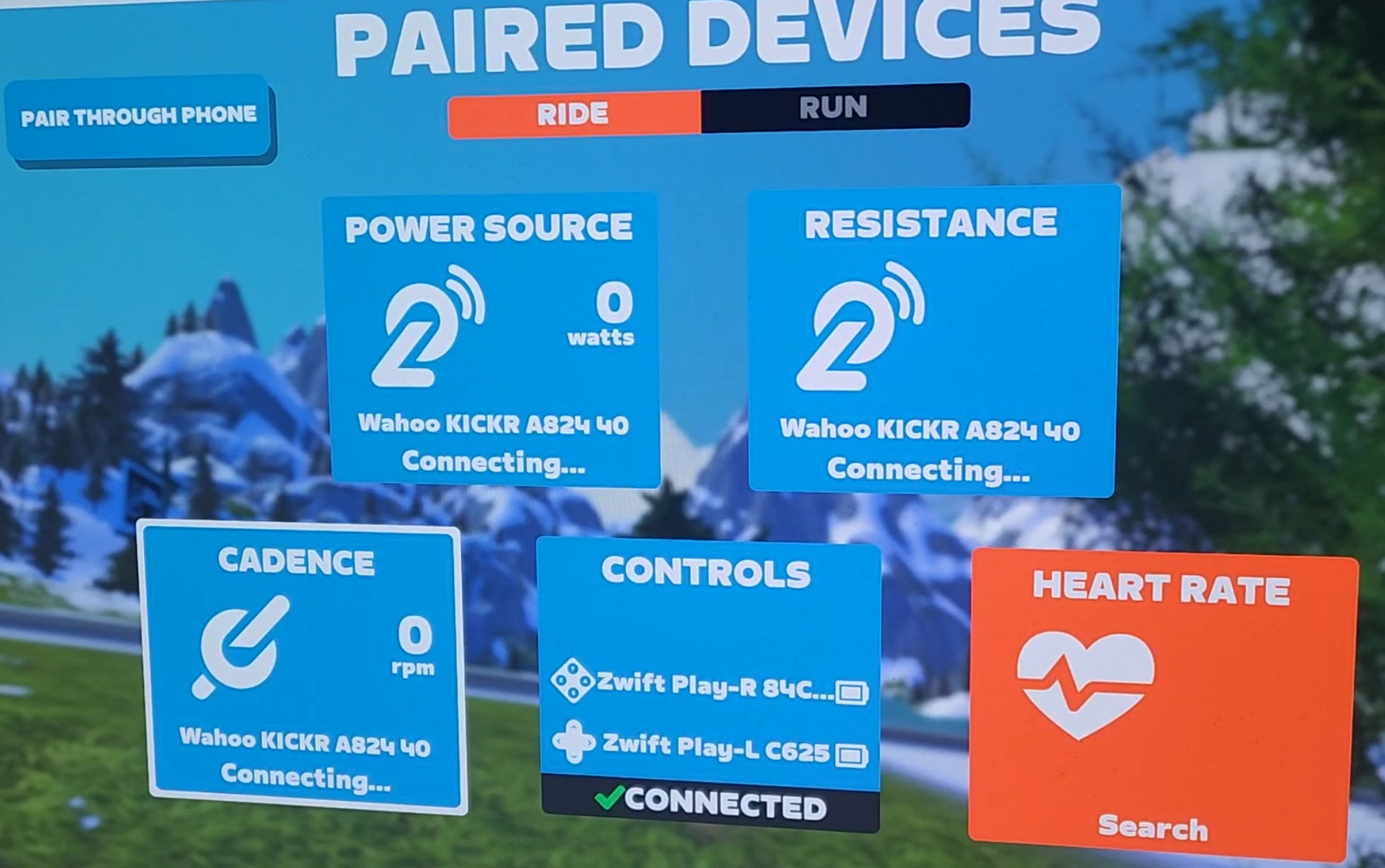
I had connecting / connected constantly flashing on and off on the device connection screen.
Both trainer and zwift up to date. Been on last 7 days.
There was no issue with the cycle.
Obviously just a small bug.

1 Like

If you’re pairing via WiFi it might be this issue, which is something they’re working on

I think it’s not just Wi-Fi, but also DirCon as well.

1 Like

I might be wrong, but I believe that Dircon includes both the wired (Ethernet) and wireless (wifi) options.

1 Like

I am not so sure.
DirCon leverages Bluetooth.
WiFi does not.

According to DCR’s review of the Kickr v6, “Regarding the WiFi components, what’s cool here is that these use the exact same protocol as the existing Wahoo Direct Connect feature, which has been around for almost two years”.

Most likely connected to this issue - Kickr Bike v2, got the Connecting/Connected cycle on the pairing screen since the last update, but everything seemed to work fine regardless. However between Tiny Races events 2 and 3 today something went wrong with my virtual gearing; noticed during the warm-up for race 3 that it felt much harder than it should have, and indeed when the race started it turned out that gear 4 (as shown on screen and on bike) felt more like gear 8. Before race 4 I quit out of Zwift completely and turned the Kickr Bike off and on. On reconnecting, everything was back to normal. I can’t say for sure that the gearing felt right during race 2 either. Haven’t experienced this before, suspect something maybe isn’t being reset when jumping straight from one event to another

3 Likes

Same issue on kickr bike v2 when pairing over wifi. Connecting/connected constantly flashing on the pairing screen. When cycling it seems to give proper proper power/resistance for a couple of minutes before it stops working. Last time it got stuck at 40w / 1rpm even though I was not pedalling.

Never had any problems before the v1.100 update. Tried rebooting the bike, rebooting wireless access point, reinstalled the game, running zwift on another pc - but the problem persists.

2 Likes

And today, ending a group ride and joining a robo-pacer in a different world, the gears were much easier than they should have been. I would never normally use gear 10 except on a steep downhill but it felt like 6 or 7. I think it may depend on which gear I was in when I ended the previous ride - it contributes to some kind of gear offset for the next ride

1 Like

The workaround works with my JB Victory bur when will this issue be fixed so I can connect to wifi, like before ! Wifi is much more stable and reliable in my situation.

Also experiencing the Wifi Connection issues as other have noted since this release.
Wahoo Kickr Bike V2 (with latest firmware) connecting via wifi
Win 10 OS
Zwift & Companion app at latest version

When I try to connect to Zwift, it appears as if it’s connected (shows connected on the screen) but doesn’t register any watts or cadence output from the bike. Exiting Zwift and trying again doesn’t solve the issue. However, if I unplug the power from the bike, wait 30+ seconds, then restart Zwift to connect to game, I am able to get the bike connected and watts/cadence output is recognized. The connection screen does flash between ‘connected’ and ‘connecting’ but doesn’t seem to impact things once I’m in-game riding.

Wifi connection has been solid for years until this release. So for now, I unplug the bike when not in use and plug it back in when needed which seems to reset the connection. The flashing between ‘connected’ and ‘connecting’ shouldn’t be happening but so far hasn’t affected game play. Hopefully, Zwift can resolve the issue or revert the wifi connection protocol prior to this release.

4 Likes

so it isn’t just me, since the 1.100 update and using virtual shifting I am riding at a much lower gear for the same power effort. e.g. gear 8 feels what used to be gear 11 or 12. very frustrating as ZRL starts soon and I need to race.

Yep me too Gary. Hopefully they (Zwift) sort asap

I have been using my Kickr v6 with my Windows 11 Pro PC and Zwift using a direct connect (ethernet) module for about a year with no issues. I switched to it back then due to numerous WIFI and BT dropout issues that I wasted far too many hours troubleshooting. The DirCon has been rock solid since I switched to it.

Two days ago when I started Zwift, my trainer would not connect to the app using the DirCon, and despite troubleshooting it, it still won’t. I have made zero changes to my system and setup. I have rebooted numerous times, unplugged and replugged each connection a few times (ethernet, power, Kickr, DirCon, router, etc.), swapped ethernet cables 2x, R&R’d the Zwift program, and I verified that all devices are running the latest FW, drivers, and Zwift version.

When I start Zwift I spin the cranks first to make sure the Kickr is ‘awake’ (blue and white LEDs on or blinking). I can’t attach a video, but in the images, the 3 Kickr windows (power, resistance, cadence) fairly rapidly sequence between “connected” then “connecting” and the cycle is continuous (I wasn’t wearing my HRM in the images). If I begin a ride like this, no power or cadence is displayed, and the mileage doesn’t record. I then tried connecting using BT, and everything connected normally. But as I said earlier, I had a lot of BT connection issues before, and don’t want to deal with them again.

Nothing I have tried has fixed it. As I stated, I have been running this exact setup for over a year with no issues. Any ideas? Thanks!

1 Like

I just posted this (below) in the “Bugs” section, I didn’t know that it was a known issue.

I’m having the same problem, just started a couple of days ago. Thanks.

“I have been using my Kickr v6 with my Windows 11 Pro PC and Zwift using a direct connect (ethernet) module for about a year with no issues. I switched to it back then due to numerous WIFI and BT dropout issues that I wasted far too many hours troubleshooting. The DirCon has been rock solid since I switched to it.

Two days ago when I started Zwift, my trainer would not connect to the app using the DirCon, and despite troubleshooting it, it still won’t. I have made zero changes to my system and setup. I have rebooted numerous times, unplugged and replugged each connection a few times (ethernet, power, Kickr, DirCon, router, etc.), swapped ethernet cables 2x, R&R’d the Zwift program, and I verified that all devices are running the latest FW, drivers, and Zwift version.

When I start Zwift I spin the cranks first to make sure the Kickr is ‘awake’ (blue and white LEDs on or blinking). I can’t attach a video, but in the images, the 3 Kickr windows (power, resistance, cadence) fairly rapidly sequence between “connected” then “connecting” and the cycle is continuous (I wasn’t wearing my HRM in the images). If I begin a ride like this, no power or cadence is displayed, and the mileage doesn’t record. I then tried connecting using BT, and everything connected normally. But as I said earlier, I had a lot of BT connection issues before, and don’t want to deal with them again.

Nothing I have tried has fixed it. As I stated, I have been running this exact setup for over a year with no issues. Any ideas? Thanks!”

2 Likes