Zwift Cog v2 for Tacx Neo 2 trainers [September 2025]

The Zwift Click and Cog v2 upgrade kit sold in the Zwift Shop since September 9 2025 comes pre-installed on a trainer-specific freehub body. The cassette body pre-installed on the Zwift Cog v2 may or may not fit on Tacx Neo 2 trainers depending on its date of manufacture.

Will fit as shipped from Zwift Shop May require chain whip and lockring tool
Neo 2T Smart Neo 2 Smart
Neo 2 Smart SE
Neo 3M Smart

Older generation Tacx trainers were designed for bikes with quick release rear axles. Newer production trainers made a running change to fit either quick release or thru-axle bikes. Garmin describes the change to the Tacx Neo series trainers as Type 1 or Type 2 axles.

If the axle end caps on your Neo 2 Smart have white letters and numbers

If the axle end caps on your Neo 2 Smart are all black

The Zwift Cog v2 can be removed from the pre-installed freehub body. You will need a chain whip and cassette lockring tool.

  1. Follow these instructions to remove the multi-gear cassette on your Tacx.
  2. Repeat the steps to remove the Zwift Cog v2 from its freehub body.
  3. Slide the Zwift Cog v2 onto the splines of the trainer’s freehub body.
  4. Secure the Zwift Cog with the lockring.

If you own a MY2020 or newer Tacx Neo series trainer:

The Tacx-specific Zwift Cog 2 will fit your trainer without special bicycle specific tools.

If you need assistance with cog removal or installation, please contact Zwift Support, and we’ll be happy to provide one-on-one assistance!
Wow. I had no idea the New Cog + Click V2 kit for TACX comes with the TACX freehub installed. I got the new kit just because the Click V2. I have a Cog V2 purchased before Sep 9th already installed in my NEO 2T. At $49, this is a steal. Just the TACX freehub alone from Garmin is $80. I think I’m going to purchase one more to keep as spare lol.

2 Likes

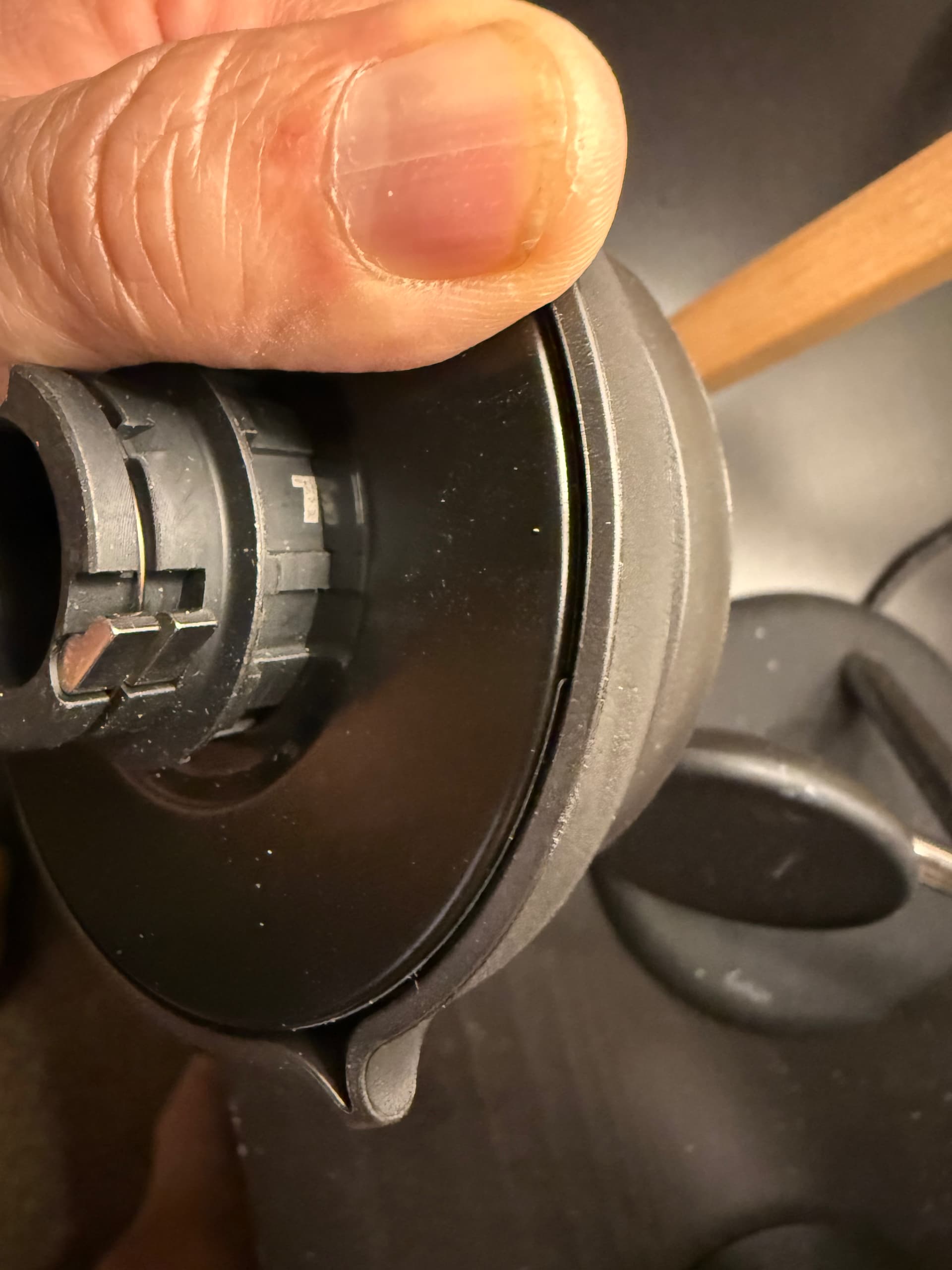
I have a Neo T2 which has a Type 2 axle, however the Cog I’ve just picked up today does not fit (picture below shows my freehub and you can check the model number on the Garmin website-it is 100% a Type 2 axle). Is it possible Garmin don’t have correct information?

Took me 45 minutes to finally work out it will never fit as is when I was trying to install the Cog. All good though - I can see from GPLama’s video breakdown of the V2 Cog that it should be a cinch to put my freehub inside it.

I have heard from one Facebook user who ordered the Tacx Cog/Click upgrade kit and received a unit with the incorrect freehub body. Zwift replaced it with the correct model. It’s possible that’s what happened here so I would contact support. You may as well have a spare freehub of the correct type since you already paid for it.

1 Like

It seems that with the code GARMIN20 you can get 20€ off the Zwift cog and click upgrade-kit for Garmin versions.

I have the same issue, how did you resolve it?

HI mate, as I mentioned you can just swap out the freehub that comes with the Cog with the freehub that is on the Neo. Also someone mentions above that Zwift might replace the hub with the correct one. I am going to contact them to try that.

I was just looking at the Cog/Click in the Zwift shop (I need something to put on my Christmas list!), and noticed the note circled in the screencap below, which seems to contradict what this post is saying. Should the note in the Zwift Shop be updated, or has something changed that renders this ‘fix’ obsolete?

The only problem is that the included freehub body won’t fit a type 1 axle. That is the meaning of the comment Shuji made. You can remove the Cog from the included freehub and install it on the freehub currently on your trainer.

Yes, I get that part. But the note on the page in the Zwift shop would seem to be saying that it’s not at all possible for the Cog/Click to work with the Type 1 axle on the Neo 2. I feel that it would be better if the note stated something along the lines of the included freehub body not working with the Type 1 axle, so the user will need to have the correct tools to remove it and put the Cog onto their existing freehub body.

1 Like

Hi there - just ordered the new Cog and Click v2 for use on my Tacx Neo 2 (axle 1 type) as part of my planned return to Zwift after a 2 year break.

My understanding is that I can "simply” remove the pre-installed freehub from the new Zwift Cog, and then slide the Cog over my existing Tacx freehub.

Do I just use a chainwhip and lockring tool on the Cog in isolation (like on the floor)? as assuming I won’t be able to mount this on the axle as the Tacx freehub will be in the way! Or are there any videos that break this down?

Appreciate any help in advance!

There will be others along with technical knowledge.

Is there a particular reason you want to put the new Cog on and not just use your existing set up but with the new Click V2 ?

That’s the backup plan if I can’t get it to work. But ideally this will let me have one less bike in the garage and just swap between the trainer and the rear wheel, without all the cassette misalignments and adjustments!

Ok. I have only one bike and it permanently sits on the Neo 2. Everything is old but bedded in so I didn’t want to be bringing a new cog into the equation. When anything needs replacing I expect I will fit new cog and new chain at the same time.

Staying with multiple gears at the back has allowed me to try 3 or 4 gearing combinations with the virtual shifting but I’m not sure I have noticed any or much difference.

Hello, je souhaiterais acheter une kit Zwift cog and click pour mon Elite Justo, mais Zwift n’a aucun revendeur, et ne livre pas en Suisse. Zwift me rĂ©pondent qu’ils ne prĂ©voient pas de permettre les livraisons en Suisse prochainement. La Suisse reprĂ©sente certainement un marchĂ© intĂ©ressant, et les moyens de livraisons actuels me semble rĂ©alisables. Zwift me conseil de crĂ©er une Ă©mulation sur les forums
 Je suis déçu, et trouve malheureux de ne pouvoir amĂ©liorer mon Ă©quipement. Est-ce qu’il y a d’autre clients dans cette situation ?

Zwift Cog installation for Tacx Neo trainer.