Is there a way to rollback the update?
Same issue as wellMac Min M4 Silicone
Working fine for me on Win11. Downloaded Tuesday, connected via BT instead of ANT+ and noticed in the first ride that TD had reset to default, but was otherwise pretty stable. Thursday ride a bit slow to connect (ANT seems quicker) but no resistance issues. Didn’t recheck TD and thought a couple of the ramps were not as stiff, but maybe just not set the slider to where it previously was. I think I’m on BT to the laptop not the Companion. Play Controllers also playing nicely.
I’m Zwifting now so haven’t read all replies but my ZCA is not showing the game map .
Hey everyone - thanks for your patience. We’re rolling out version 1.104.3 which fixes the “resistance is futile” issues starting on Windows / macOS / Android. Please update when it’s available to you.
iOS and tvOS releases will follow shortly. We’ll update this thread when that is available.
11 Likes
I just upgraded the ZCA.
Still not showing map.
Yes! Please please please fix the resistance issue zwift peeps! With the holidays coming quickly, I rely more on my trainer. I have a zumo and I have done everything to fix the problem but it’s no resistance and no power at 12% grade
1 Like
An update with the fix is now available to all Zwifters on Mac, Windows, and Android (game update version 1.104.3) and we are just waiting on Apple’s approval for updates for iOS and Apple TV which should be complete soon. If you are on Mac, Windows, or Android, please update at your soonest convenience to resolve this issue.
5 Likes
Hey @Tim_Camden_C
I checked your server logs and the usual suspects don’t show up in your case. You’re running Zwift on Windows and Companion on Android, so you won’t have the issue that iOS Companion users run into following an OS update.
Have you already tried rebooting your WiFi router / PC / phone to reset all those things on the local network?
Wanted to follow up - Updated my Mac Mini OS to 26.2, allowed Zwift on my local network. I opened Zwift and downloaded the “Patch” and was able to successfully pair my power, resistance, and cadence to the Stages SB20 - I tested on the climb portal and can confirm I have resistance again.
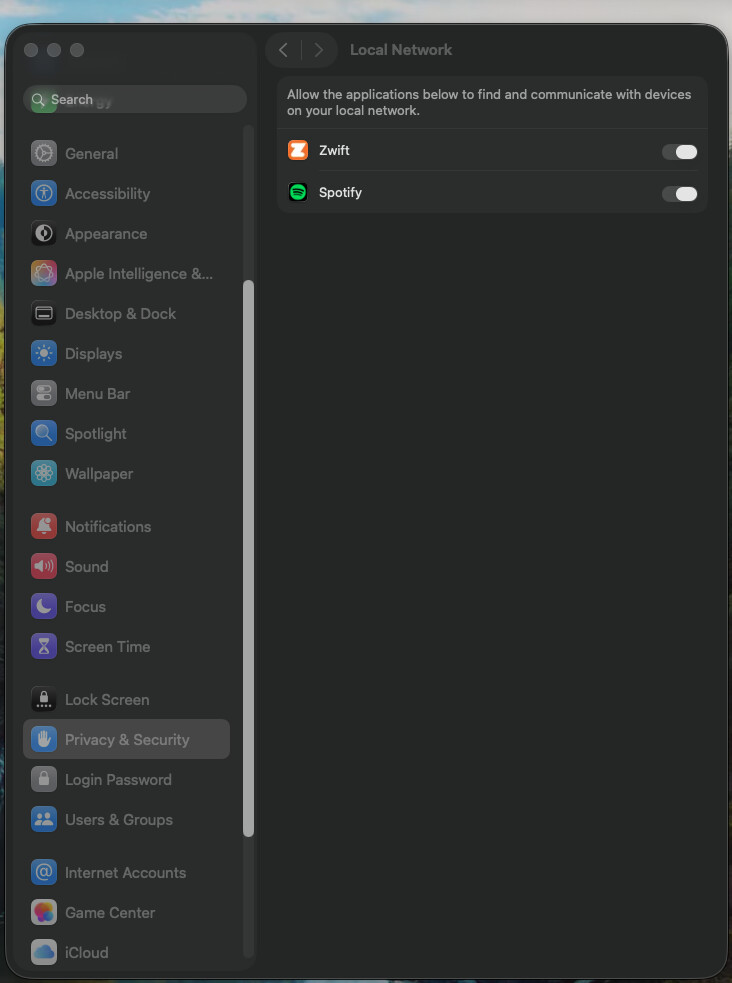

5 Likes
I will do so.
Everything else is working well.
This issue occurred a few weeks ago during a race and I just used the keyboard for power up because I was racing.
The issue wasn’t present on the next ride, at least I didn’t notice but I’m upgrading aTT bike so the power up are 10 xp.
My next ride is Saturday.
I’ll post an update.
Thanks.
Restarted phone and computer and started a session and ZCA still didn’t show the map.
I didn’t pair anything.
Don’t think that should matter.
I’ve tried this. I still cannot connect to either my iPhone , iPad, or Apple TV. The pedals show up, but not the actual bike for resistance and ERG mode for my SB20.
Thanks @shooj and @evan-zwift for getting a fix out so fast. Never expected it would be so quick.
4 Likes
I’m sad to say, it’s not fixed.
I did a try this morning, classic, direct connect through wire, RJ45. Connection was OK, but not a single tilt.
I coupled again in BT and tilt worked back perfectly.
1 Like
That hoopy @shooj knows where his towel is
1 Like
Great news: last night’s patch to version 1.104.3 fixed the issues for me! All back to normal here on my Stages SB20. Thank you Zwift HQ for getting this sorted quickly!
3 Likes
And suddenly I started having bluetooth issues again. My PM suddenly disappeared and zwift doesn’t see it or if it does doesn’t connect!!!
And even though ant connect there is nop power or cadence!
I seem to have suddenly lost all my route progress badges in the route choice menu? I did a route I’ve done before and didn’t get the notification in game so seems to be the badge marker itself that’s broken. On Apple TV if that’s relevant
Can confirm it works for me on the SB20 as well with the 1.104.3 update. Thanks for the quick resolution. 