Hi everyone, Phased rollout to macOS / Windows / Android devices starts today. Phased rollout to tvOS / iOS starts tomorrow.
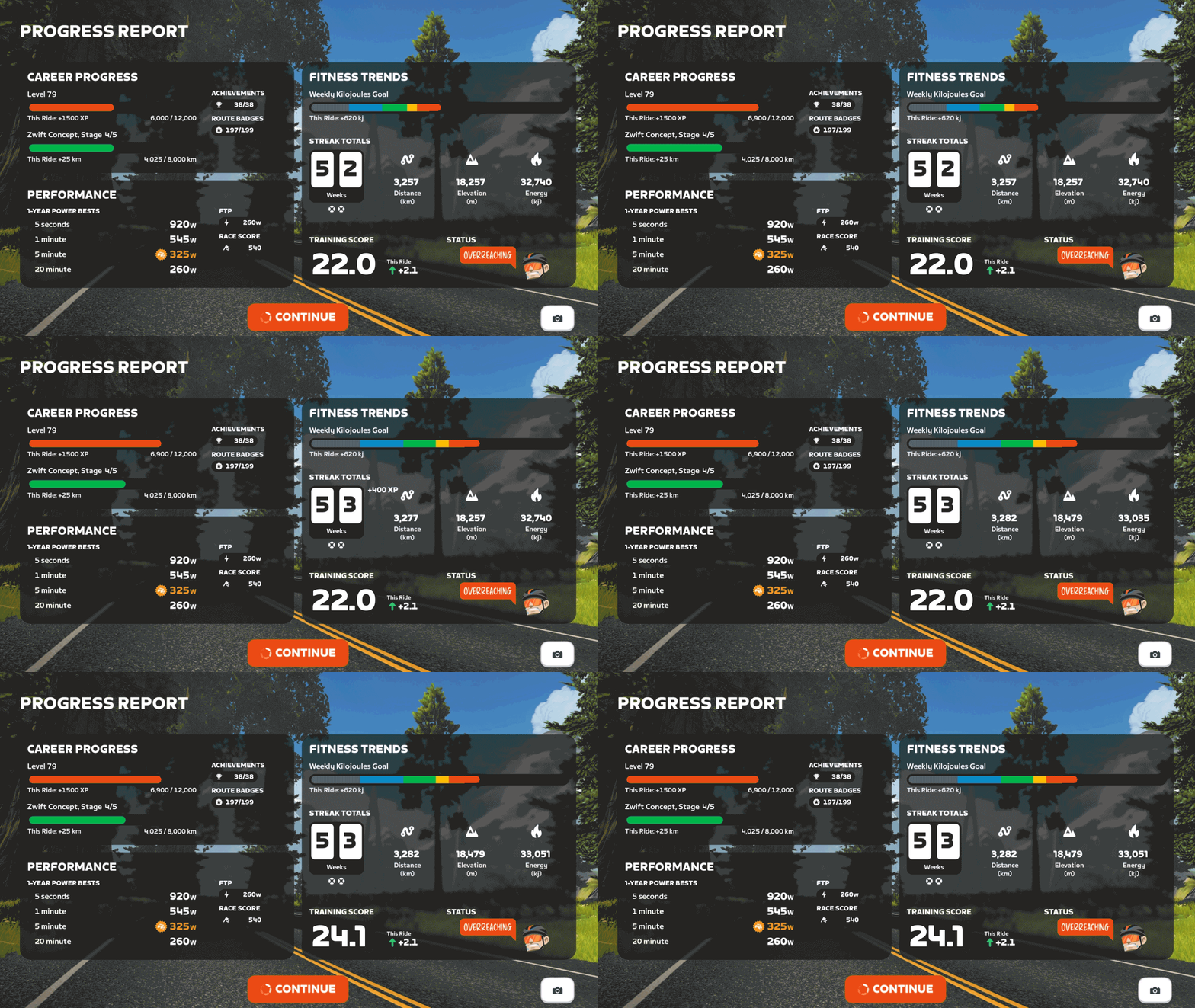
A new Progress Report screen is now available at the end of every cycling activity and shows career progress, fitness trends, and performance data. The new Progress Report replaces the previous Streaks screen, and includes all information previously featured in the Streaks screen.
Six routes that were previously event-only are now available for free rides and meetups. Go get those badges! No Sleep Till Brooklyn (New York) Richmond Rollercoaster (Richmond) Innsbruck KOM After Party (Innsbruck) Yorkshire Double Loop (Yorkshire) Southern Coast Cruise (Watopia) Jarvis Seaside Sprint (Watopia)
Reduced the effort required to ride up the escalators in New York.
Improved the New York escalators to better balance the boost effect across riders of different weights.
Zwifters using Zwift Click v2 can now disable virtual shifting in Zwift Settings under the Hardware tab.
Fixed an issue that could potentially cause connection issues when pairing fitness devices using Wahoo Direct Connect (WiFi or Ethernet).
Fixed an issue that could cause a saved activity to have an incorrect name in some situations.
UPDATE: The long-awaited Draft Indicator is finally here! The new bar at the bottom of the HUD center keystone will show you when you are receiving a draft benefit, the longer the bar the greater the draft benefit - use the Draft Powerup to get max draft benefit! Details are on this thread.
UPDATE December 17
Phased rollout continues to Windows / macOS / Android / iOS.
Phased rollout to iOS/tvOS begins today.
UPDATE December 19 Zwift game v1.104.3 is rolling out to macOS / Windows / Android first. iOS / tvOS release will follow shortly, pending App Store review.
Fixed an issue where resistance may not work as expected for some trainers connected via Bluetooth or WiFi.
Android: Fixed an issue where JetBlack Victory trainers do not get discovered over Wi-Fi
UPDATE December 19 tvOS rollout of 1.104.3 has begun. iOS is pending App Store review. Phased rollout to all platforms is complete.
UPDATE January 5
Zwift game v1.104.4 is rolling out to macOS / Windows / Android / iOS / tvOS
Are you ready to party? The Tour de Zwift is here! The biggest party on Zwift only happens once a year—don’t miss it.
UPDATE January 6
Phased rollout of game version 1.104.4 is complete to all OS platforms.
Do you have questions or issues to report? Let us know below.
I wonder if the “connection issue” bug fix is related to the weird experience I had this morning. Riding with Coco in Yorkshire. I had a couple of times when all riders other than Coco disappeared from the screen, and then Coco would race ahead (I’d have to do 4w/kg+ to even hope to stay with her), then Coco would disappear as well. I got a “connection lost” message in the top left of the screen, but it was still recording my wattage and everything else correctly so I was still connected to Zwift. After a short wait, I would do a teleport to rejoin Coco and all the other riders were back as well. Happened 3 times and my drops multiplier reset each time. Very weird.
Thanks. I didn’t actually check wifi but I don’t think it was that as I was also using companion app throughout, which IIRC needs to be on the same wifi network in order to connect to the game. My PC is also on an ethernet connection so pretty solid. Anyway, it was no great drama thankfully as the ride was all recorded, I just had to earn the drops multiplier again. If it happens again I’ll use my phone to check wifi.
if you are using a PC, it is easy to drop a log file into TrainerDX.com and see what disconnects they can find. I’m pretty confident it was your network (keeping the companion app connected might not be a good indicator). If TrainerDX shows network drops, just try a restart of all your network equipment to start, power off for a few minutes, plug it all back in. That usually clears these things up.
Reading the ZI article on this, reducing trainer-gradient-feel is exactly what I’ve been kicking around in my head as the way to fix this. Feeling like 5% instead of 19% should be just the ticket. The boost used to be 1200w, what’s the wkg boost?
Really would be nice if the Progress Report had “This Ride” 5s/1m/5m/20m power numbers next to the PRs. FTP and ZRS could slot in up a little above where they are, make it right-justified and next to each other across from where “PERFORMANCE” is left-justified.
”Fixed an issue that could cause a saved activity to have an incorrect name in some situations.” is this related to Pace Partner ride naming?
@Tony_Lane when checking the events from your ride earlier today on our side I can see 3 separate times where you were disconnected from our Zwift servers. These disconnections look to all have occurred within the first 6 minutes of you first joining Coco, and I can see that you rejoined the Coco each time afterwards like you described.
Like @Mike_Rowe1 mentioned these are likely (but not always) caused by a network issue with your PC in this case. If you continue to experience this after trying our tips here, I do recommend that you please contact our support team so one of our folks can look into this further and help resolve this for you.
Since W/Bal is a trademarked product, I doubt this is going to happen. Same with TSS and some other “nice to have" stuff. Maybe one of the Zwift folks can step in and confirm/deny.
With the new version it’s impossible to pair my Stages SB20 with zwift on my desktop PC. I tried it on my phone (there I haven’t got the update yet, and there it works).