Has anyone figured out HOW to connect the Core Body sensor to Zwift? I thought that it would be through the “Controls” pairing screen but I do not see the sensor there.
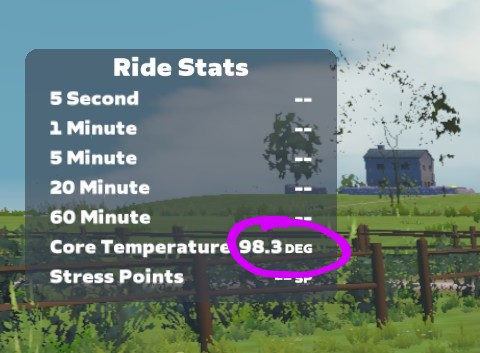
Update: I was able to pair it via HR pairing screen. The new issue is that it only shows the Core Temp in °F and not °C. Looks weird that the setting has that correct but the actual game does not. See below.
The body temperature showing up in Farenheit is an issue we had ironed out before this feature rolled out. We’ll investigate why this is back, thanks for the report.
Glad you sorted out how to pair the CORE body temperature sensor. For others CORE sensor users who google their way to this thread - you should already have the CORE device paired to your heart rate monitor? Assuming yes - you then pair your HRM to Zwift in the Pairing Screen before you select Core Temperature in your game settings.
There’s a bug with the Core2 body temperature sensor HUD feature in Zwift. Even though my settings are set to metric, the temperature shown on the HUD displays in Fahrenheit.
Here’s what I’ve tried so far:
Switched from metric to imperial and back again
Restarted Zwift
Repaired the sensor
Verified the sensor is set to metric in the Core Temp phone app
Confirmed it displays correctly in Celsius on my Garmin 840
Despite all this, Zwift still shows °F in the HUD. Would appreciate if this could be looked into, seems like a bug with how the HUD reads sensor data.
We’ve been investigating your body temperature data defaulting to Farenheit, and can use your help to eliminate some root cause suspects.
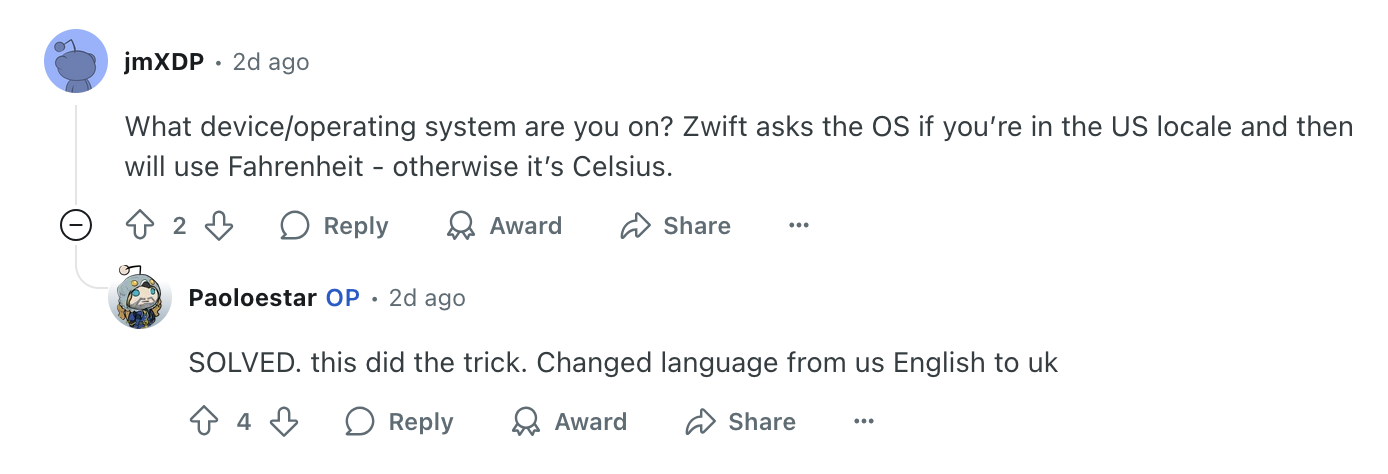
The game might be thinking you’re located in the US, where Farenheit is expected and correct. Would you check these things please?
On your Zwift computer’s OS settings - what is your home region set to?
Do you use a VPN on that device or WiFi router for your local network? If so - what’ the VPN destination typically set to?
If practical - could you take your laptop/tablet and HRM and use a different WiFi connection as a test? Tethering your device to your phone’s, or a local cafe’s WiFi?