Zwift Camp: Build [November 2025]

Everything You Need To Know

In Zwift Camp: Build, you’ll take to the tarmac to build up your strength and chase speed! It’s all structured around challenging in-game features like HoloReplays, RoboPacers, LapSplits, RideStats, and more. Over six weeks, you’ll have five fresh workout experiences to apply your power across epic routes and lock in your cycling fitness. Are you ready to build? Let’s roll.

These workouts are inspired by the same standard time intervals as Zwift Camp: Baseline, designed to give you well-rounded strength across your power curve. The difference? We want you to take your power out onto virtual roads in a Camp that’s all about Full Gas Fun!

  • We’ll have your Ride Stats and Lap Splits already plugged into the HUD. These features help you stay in the zone, hit your targets, and race your best self.

  • Make sure you have your HoloReplay set up for your best personal efforts! Go to Settings and then Preferences—set Segment HoloReplay to Most Recent, Leaderboard HoloReplay to Hide, and HoloReplay Privacy to Private.

  • RoboPacers are not scheduled within On-Demand. If you’d like to ride with RoboPacers up The Grade and Alpe du Zwift, they are available in every scheduled event.

  • The workouts in Zwift Camp: Build take you to the tarmac, where you’ll apply your power to the terrain within each route. Each effort in the workout is a segment. It can be done at any pace and intensity of your choosing.

For those not in the Northern Hemisphere, Zwift Camp: Build is here to help you with your summer goals!

Registration for Build will be automatic upon log-in to Zwift beginning November 10, 2025 at 16:00 UTC. Zwift Camp: Build starts on November 10, 2025, at 16:00 UTC and ends on December 22, 2025, at 07:59 UTC. If you’d like to ride with RoboPacers up The Grade and Alpe du Zwift, they are available in every scheduled event. RoboPacers are not scheduled within On-Demand.

Zwift Camp: Build will have five workouts over six weeks. You can sign up for group workouts or complete any of them on demand by clicking into the tile.

Events will be scheduled to run every hour, including during make-up week.

WORKOUT 1 - Glasgow Crit Six/Champion’s Sprint: November 10, 2025 @ 17:00 UTC - November 17, 2025 @ 16:00 UTC

WORKOUT 2 - Bon Voyage/Dos d’Ane Sprint Reverse: November 17, 2025 @ 17:00 UTC - November 24, 2025 @ 16:00 UTC

WORKOUT 3 - Hot Laps/Volcano Circuit: November 24, 2025 @ 17:00 UTC - December 1, 2025 @ 16:00 UTC

WORKOUT 4 - Hilltop Hustle/The Grade: December 1, 2025 @ 17:00 UTC - December 8, 2025 @ 16:00 UTC

Workout 5 - Road To Sky/Alpe du Zwift: December 8, 2025 @ 17:00 UTC - December 15, 2025 @ 16:00 UTC

MAKE-UP: ALL WORKOUTS December 15, 2025 @ 17:00 UTC - December 22, 2025 @ 06:00 UTC

Workouts 1 - 3 have workout scripts that pop up on the screen, guiding you through each effort. Workouts 4 - 5 do not have workout scripts; instead, they have RoboPacers in events to help with your pacing.
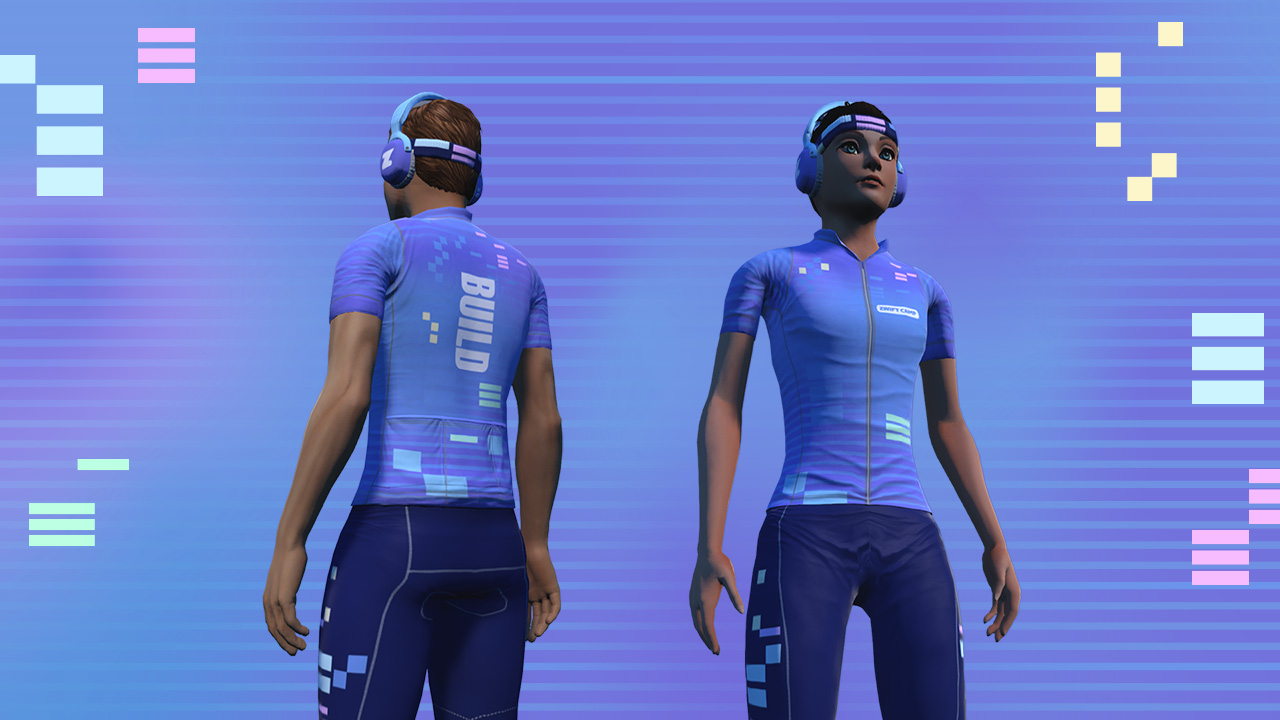
You will unlock the Build Socks after completion of one (1/5) workout, Build Headphones/Headband combo after three (3/5) workouts, and the Build Kit after all five (5/5) workouts.

To learn more about Zwift Camp: Build, check out the main page here or the FAQ here.

We used to be able to close/dismiss these special event banners on the companion app but that seems to have been removed for the Build Camp. Please bring this option back. I’d like to remove this from the companion app.

Thanks!

4 Likes

How do I get post-ride results that actually tell me what my sprint power results were? Nothing useful in the post-ride reports. Even in-ride the splits aren’t much use as they show lap splits, not power Segments, robopacers placing through the sprint doesn’t relate to sprint power (you could start sprinting later but put out a better 5s power and still be behind the pacer), and I don’t recall getting a visual clue centre screen what the 5s power was for the sprint I’ve just done.

2 Likes

Now that I’ve done the first Build event, I have no idea what Zwift ended up recording for my performance.
Where are the stats for the events? I can see Max Power, but not 5 second power.
There should be a dashboard with the results.

1 Like

I did the first two camp build rides as a free ride and the activity name only included the world. So the first one was called “Scotland“ instead of “Zwift - Champion Sprint on Glasgow Crit Six in Scotland“ and the second one “France“ instead of “Zwift - Dos d’Ane Sprint Reverse on Bon Voyage in France“ (I manually renamed them).

That’s usually what happens when an activity fails to save and is later recovered

I rode the Road to Sky as a free ride this morning, selecting it from the Watopia World menu, not the Stage 5 of the banner, and was still credited for completion of Stage 5 of Zwift Camp: Build.
I was not expecting that.

I did the first two camp build rides as a free ride and the activity name only included the world. So the first one was called “Scotland“ instead of “Zwift - Champion Sprint on Glasgow Crit Six in Scotland“ and the second one “France“ instead of “Zwift - Dos d’Ane Sprint Reverse on Bon Voyage in France“ (I manually renamed them).

Same here.

Did the first ride too, but the name was correct:

Zwift - Group Ride: Stage 1 - Zwift Camp: Build on Glasgow Crit Six in Scotland

I did a Free Ride .. maybe that´s the reason.

Missed chance for orthodontic headgear. This would be so cool.

1 Like

Seems to not be limited to camp build. I got the incorrect activity name on both camp build rides I did so far (as free ride / on demand), but I also got an incorrect activity name yesterday when riding an hour with Constance. On the days in between I did workouts and they all got a correct activity name.

I’ve completed 2 Zwift Camp Build rides but don’t get a map on Companion app. Companion just shows “Free Ride” with an estimated completion time of somewhere in the region of 333 hours. I know I’m not quick but I wouldn’t expect to take that long and I would like a map to know where I am and maybe able to get an idea of where the sprints etc are going to be.

Anyone got any ideas, what am I doing wrong?

I did the Alp also. There was no dialogue or instructions.

Stage one worked, except when it said one lap left and actually there was two.

4+ 1=2? Lol

I didn’t get an email or stats for any of the stages.

I assumed the last lap was a cool down.

The workout was OK. It’s really not clear whether the aim is a 5s power burst or the full sprint segment.

And the activity title was simply “Zwift - Glasgow Crit Six in Scotland” from doing it on my own rather than in an event.

Workouts 4 and 5 have no script and no robopacer if you do them on your own, that feels less than ideal. I wonder if you could get holo-replays of the pace partners.

My holo played and it made me a little faster.

Stage one is 5 seconds but they want you to sprint six times.

Stage 2 is one minute though some may power it under a minute.

There are also 3 sprints per lap, which is not mentioned in the event info.

And there’s still no way of actually reviewing your efforts post-event. Have I done better than in Baseline? I have no idea….

That’s a major fail on Zwift - not being able to see how you performed post ride.

You could check on Strava. But only the first Sprint of the three is round about a minute.